Timesheets - Preliminary Setup
This page provides guidance for the preliminary setup of timesheets in Wageboxx. The primary setup required is for Office Shifts, which directly affects payroll calculations.
Office Shifts Setup
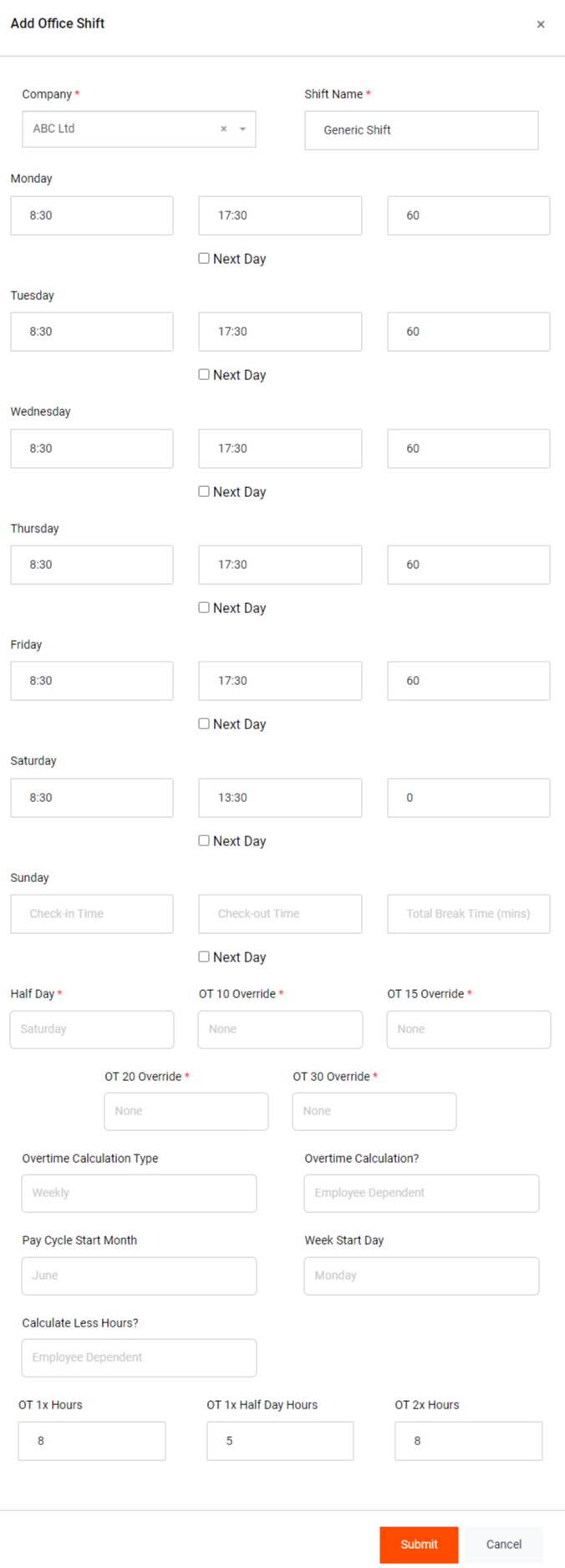
- To begin, click on "Add Office Shifts." This will allow you to define various parameters for employee work shifts.
- For each day of the week (Monday to Sunday), specify the Shift Start Time and Shift End Time using the respective input fields. Optionally, you can enable the Next Day tick option, which sets the shift end time to the next day at the specified time. Exercise caution when using this option, as it can lead to shifts spanning more than 24 hours and potentially disrupt the schedule.
- The third input field on each line is for Break Minutes that employees get during their shift.
- The sixth day (e.g., Saturday) is typically designated as the Half Day as per governmental rules. Employees may not be given break times on this day.
- Some companies may choose to override specific overtime rates (e.g., OT 10, OT 15, OT 20, OT 30) based on employee types. Select the appropriate OT XX Override option to customize overtime pay rates.
- The OT Calculation Type (Daily, Weekly, Monthly) (See: Overtime Calculation Types) allows companies to choose how overtime should be calculated. It is advisable to follow the governmental recommendation of using the Weekly calculation.
- The "Overtime Calculation?" option allows you to force overtime calculations for employees, even if they are unchecked in their forms. Similarly, you can force no overtime or use employee-dependent definitions for calculation. Our recommendation is to use the Employee Dependent setting for optimal results.
- Specify the Pay Cycle Start Month to align with the fiscal year or PAYE year for accurate employee calculations.
- Determine the Week Start Day as the first day of the week for company policy. A common choice is Monday.
- The "Calculate Less Hours?" option is similar to the "Overtime Calculation?" setting but pertains to Less Hours calculation. Our recommendation is to use the Employee Dependent option for accurate results.
- The "OT 1x, 1x Half Day, 2x Hours" refers to the maximum hours before specific OT rates are applied. For instance, OT 1x requires 8 hours, OT 1x Half Day requires 5 hours, and OT 2x requires 8 hours before OT 3x is applied. These values are based on governmental recommendations.
With these parameters set, you are ready to create office shifts and proceed with employee timesheets.
Now you can proceed to create your employees and define their work schedules based on the configured office shifts.
Overtime Calculation Types
1. Daily Overtime
In Daily Overtime calculation, the overtime hours are determined on a daily basis. If an employee works beyond their regular daily hours, those extra hours are considered as overtime. For example, if the regular working hours per day are 8 hours, and an employee works 9 hours, then the extra 1 hour will be calculated as daily overtime.
2. Weekly Overtime
Weekly Overtime calculation involves determining overtime on a weekly basis. If an employee works more than the total weekly hours, which is typically 45 hours as per governmental recommendations, then the extra hours are considered as weekly overtime. For example, if an employee works 47 hours in a week, the additional 2 hours will be calculated as weekly overtime.
3. Monthly Overtime
Monthly Overtime calculation is based on the total working hours in a month. If an employee exceeds their monthly working hours, any additional hours are considered as monthly overtime. For example, if an employee's monthly working hours are 160 hours, and they work 170 hours in a month, the extra 10 hours will be calculated as monthly overtime.
Overtime Calculation Recommendations
It is essential to choose the appropriate OT Calculation Type based on your company's policies and governmental regulations. Here are some considerations:
- Daily Overtime: Useful for companies where employees have varying daily working hours and the overtime threshold is determined on a daily basis.
- Weekly Overtime: A common choice recommended by the government for its simplicity. It considers the total weekly hours worked by employees.
- Monthly Overtime: Suitable for companies with fixed monthly working hours and overtime calculations done on a monthly basis.